
Key Highlights
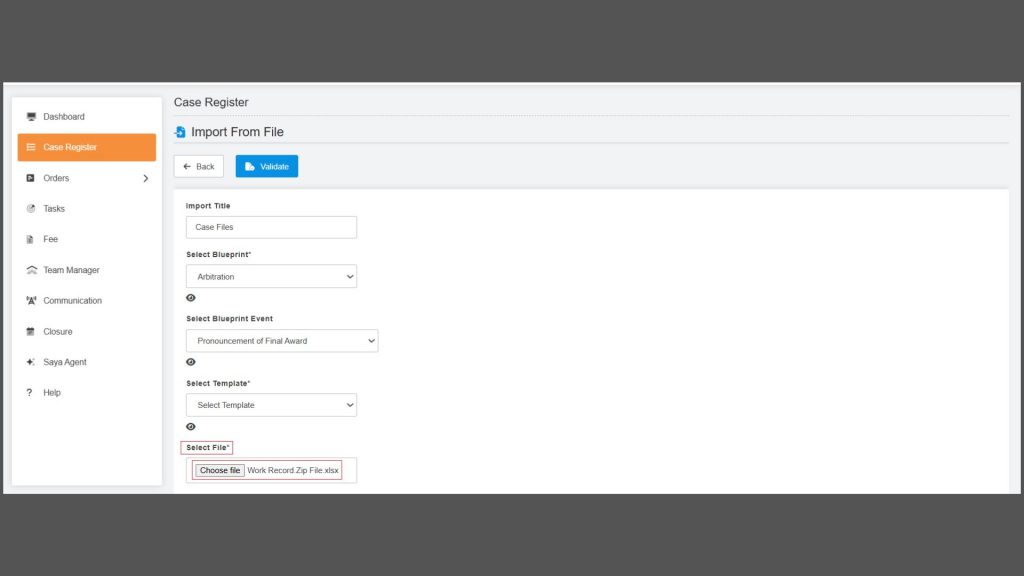
- Bulk Document Import : We have implemented an efficient solution that streamlines case imports by enabling Excel field mapping and supporting document attachments through a single ZIP upload.
- NCLT Case List and Cause List into the Jupitice Platfrom: We have developed a feature that enables users to quickly search cases and view their full litigation timelines.
- New ‘Case Teams’ Widget: The new Case Teams Widget introduces configurable, privilege-based Add, Edit, and Delete controls, transforming team management into a dynamic, flexible, and seamless experience directly within the case dashboard.
- New ‘Case Manage Members’ Widget: We have implemented the new “Case Manage Members” widget to bring streamlined, privilege-based user management directly into dashboards, enabling fast, flexible, and efficient control of case-level access without disrupting your workflow.
- Hearing Room – Attendance List & Log Details: We have implemented an automated Attendance List that provides a chronological, card-based view of participant presence—capturing join activity, first-in/last-out times, and total attendance for complete hearing-room transparency.
- Allow multiple-factor authentication options for login in Account settings: We have introduced customizable sign-in options that allow users to enable Password, OTP, and Face Recognition—supporting single or multi-method login with automatic two-factor authentication for enhanced security.
- Adding “Password” as a New Login Method in Setting Builder: We’ve expanded the Setting Builder with a new Password login option, giving administrators greater flexibility to configure secure, customizable sign-in methods alongside OTP and Face Recognition.
- Added Import Approval Workflow: We have enhanced bulk imports with an approval workflow, enabling administrator-verified, controlled, and fully trackable file processing from upload to completion.
Bulk Document Import
Managing large volumes of cases or events is now easier than ever with the enhanced Bulk Document Import functionality in Blueprint. This feature allows users to map Excel columns to platform form fields—especially File Upload fields—and attach multiple documents in a single streamlined workflow. This enhancement delivers a powerful and efficient way to import cases or events along with their associated documents:
- Map Excel columns directly to File Upload form fields.
- Use comma-separated values for multiple file attachments.
- Upload a ZIP file to store all referenced files.
- Receive detailed validation errors to ensure accurate data imports.
With this improvement, bulk uploading becomes faster, cleaner, and far more user-friendly—eliminating repetitive manual uploads and reducing errors.
NCLT Case List and Cause List into the Jupitice Platform
We have develped a feature that enables users to instantly access NCLT (National Company Law Tribunal) Case Lists, Cause Lists, and complete Case Histories directly within the platform. This feature consolidates all essential case information into a single, intuitive interface—making litigation tracking faster, easier, and more transparent.
Users can now:
- Search cases effortlessly using case number, party name, filing date, or bench.
- View a complete litigation timeline, including hearing dates, orders, and historical proceedings.
- Access real-time case details retrieved automatically from NCLT records.
- Stay informed with instant hearing notifications delivered directly through the platform.
This integration enhances transparency, speeds up legal research, and ensures that users always have accurate, up-to-date NCLT case information at their fingertips. Whether you’re tracking ongoing matters or researching past proceedings, Jupitice provides a seamless experience to support every step of your legal workflow.
New ‘Case Teams’ Widget
Managing teams within an active case has always been essential for smooth collaboration—but until now, team visibility inside a case has been static and limited. Users could only see the teams already added, without the ability to update or modify them directly from their dashboards.The new Case Teams Widget is a significant enhancement to the platform’s collaboration and case management capabilities. By providing configurable, privilege-driven team actions—Add, edit, delete—users now have the flexibility and control they need to maintain accurate team structures within every case. This feature empowers teams to work smarter, adapt faster, and maintain clean, organized case environments without ever leaving the reporting or dashboard interface.
New ‘Case Manage Members’ Widget
Managing users within a case is a core part of maintaining secure, organized, and efficient workflows. Until now, users relied on static member lists or had to navigate deeper into case settings to make updates. This widget equips users with the ability to manage case members and user assignments directly from their reporting dashboards, without switching views or navigating through multiple menus. The Case Manage Members widget streamlines case-level user management by bringing quick, privilege-driven controls directly into dashboards. With simplified configurations and a focused interface, it enables faster, cleaner, and more efficient member oversight across every case.
Hearing Room – Attendance List & Log Details
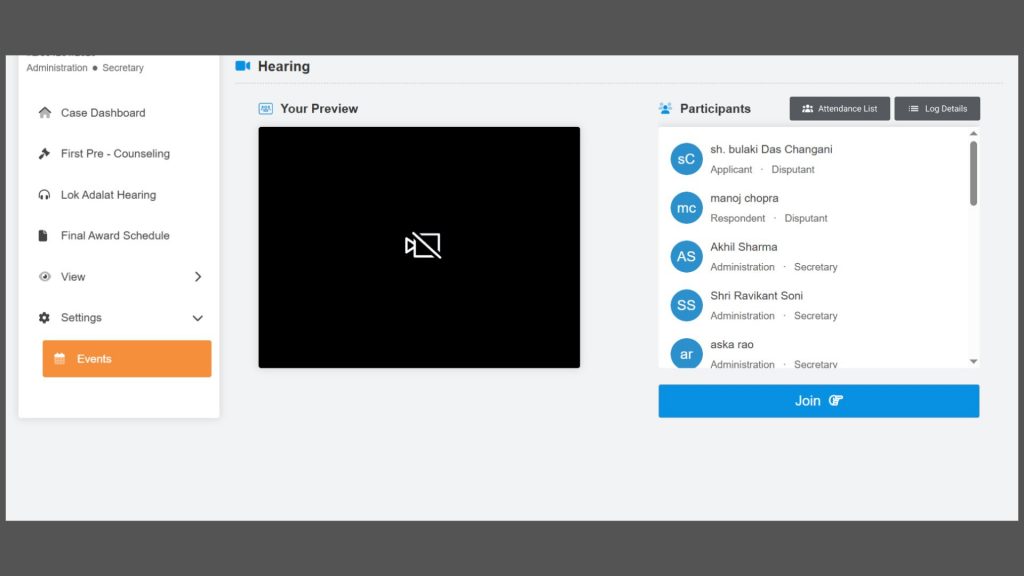
We have implemented a new automated Attendance List feature within the Hearing Room to provide accurate and transparent tracking of participant presence during proceedings. A newly added “Attendance List” button, located above the participants’ section, allows users to instantly view a chronological log of all individuals who joined the hearing by clicking the Join button. The system presents attendance details in a clean card-style layout, displaying each participant’s name, role, party details, attendance status as “Joined,” along with their First In and Last Out times for precise duration tracking. Additionally, the interface summarizes overall participation by clearly highlighting the total number of attendees and absent participants, including options to print and download the complete attendance details for enhanced hearing-room transparency.
Allow multiple-factor authentication options for login in Account settings
To provide users with greater control and security over their login experience, we have introduced a new configurable customizable sign-in options. This setting allows administrators to define multiple authentication methods that users can utilize while accessing the platform. Configured through the Setting Builder, this feature uses the fixed key sign-in-options and supports three possible authentication methods: Password, OTP, and Face Recognition. Once created, the setting appears under Account Manager, where users can select one or more sign-in options based on their preference. The setting name is also fully customizable and will appear exactly as defined during setup. Functionally, users can log in using any single selected method or, if multiple methods are enabled, the platform will enforce two-factor authentication in the predefined order: Password → OTP. If no sign-in option is selected, the system defaults to password-based login. This enhancement ensures a flexible yet secure authentication flow, empowering users with multiple ways to sign in while maintaining strong access protection.
Adding “Password” as a New Login Method in Setting Builder
To strengthen authentication flexibility and support more customizable security workflows, we have expanded the Setting Builder to include “Password” as a new possible value within the platform’s sign-in options. This enhancement allows administrators to configure Password authentication alongside existing methods such as OTP and Face Recognition, enabling a login experience tailored to specific operational or security needs.Once configured in the Setting Builder, the platform immediately supports traditional credential-based authentication—either as a standalone method or as part of a multi-factor setup. Users will then see the updated list of available sign-in options, which now includes:
- OTP
- Face Recognition
- Password (new)
By introducing Password as a configurable login method, the platform offers greater control over how users access their accounts. Whether the priority is convenience, compliance, or enhanced protection, this update provides a more adaptable and robust authentication framework across the system.
Added Import Approval Workflow
We have enhanced the bulk import process by introducing a structured approval workflow. Users can now upload bulk files, which will undergo verification by an account administrator before being reflected in the Action Dashboard. Until approved, each file will remain in a Pending state to ensure controlled and accurate data entry. Once approved, the user must initiate the file to mark the import as Complete. Additionally, all uploaded files can be easily monitored and managed through the Job Imports section, providing full visibility into import status and progress.