Filing: From Information to Registration, Building the Foundation of Every Case.
| Table of Contents |
|---|
| 1. Abstract |
| 2. Introduction |
| 3. Overview of the Filing Process |
| 4. Filing Configuration |
| 5. Section Configuration |
| 6. Using the Filing Process |
| 7. Undertaking and User Validation |
| 8. Conclusion |
Abstract
The filing process represents the formal and structured procedure through which a case is initiated, relevant party information is collected, and the required details are submitted for case registration and further proceedings. It serves as the foundation of effective case management by ensuring that information relating to applicants, respondents, representatives, disputes, jurisdiction, payments, and other case-specific requirements is captured accurately and systematically. The filing workflow is organized into headings and sections, with each section performing a defined function within the overall process. These functions may include initiating a case, managing members, identifying the dispute type, selecting jurisdiction, processing payments, applying case tags, obtaining undertakings, reviewing information through a preview, and generating a final confirmation. The configuration of these components enables organizations to design a filing workflow that corresponds to their procedural and administrative requirements. A properly configured filing process not only simplifies case registration for users but also promotes accuracy, consistency, transparency, and efficient retrieval of case information throughout the case lifecycle.
Keywords
Filing process, case registration, case management, filing configuration, manage members, primary applicant, dispute type, jurisdiction, payment, case tags, undertaking, preview, confirmation, individual filing, organizational filing, case ID.
Introduction
Filing is one of the most important stages in the lifecycle of a case because it establishes the initial record from which subsequent case-related activities are managed. It is the process through which individuals or organizations formally submit the information required to initiate or advance a case. Depending on the nature of the proceeding, the filing may include personal information, contact details, addresses, party information, dispute-related information, jurisdictional details, payment information, supporting forms, and other mandatory declarations. A comprehensive filing process must be structured in a manner that is easy for users to understand while also ensuring that the information collected satisfies the requirements of the organization or authority handling the case. For this reason, the filing workflow is divided into a series of headings and sections. Headings represent the principal stages of the process, while sections contain the individual units through which specific information is collected or specific actions are performed.The objective of a structured filing system is not merely to collect information but to create a reliable and organized case record. It enables users to provide information in a logical sequence, facilitates validation before submission, supports appropriate allocation based on jurisdiction and dispute type, and provides a unique case reference after successful registration.
Overview of the Filing Process
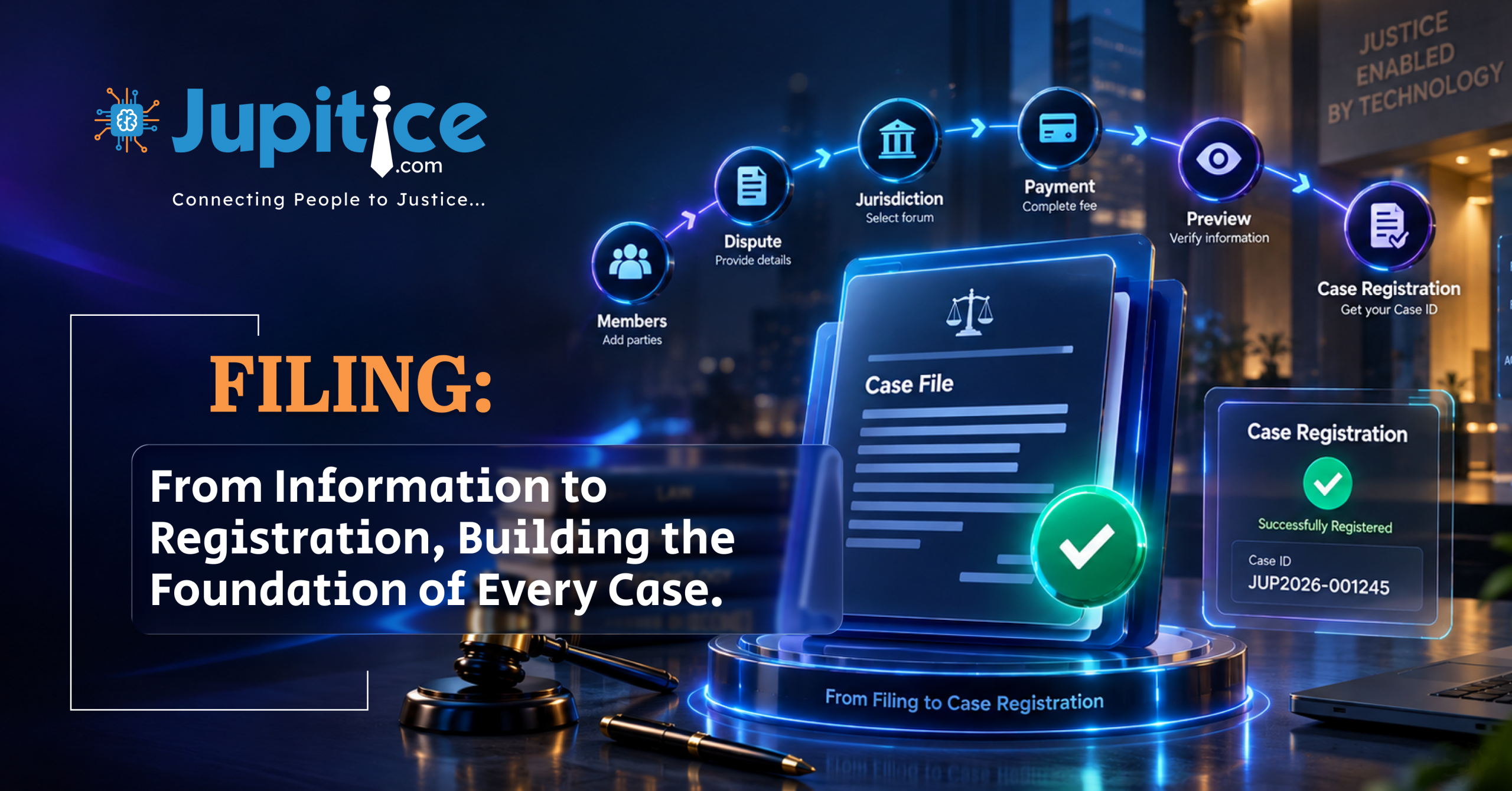
The filing process is designed as a sequential workflow that guides a user from the initiation of a case through final registration. The major components of the workflow include Initiate a Case, Manage Members, Dispute Type, Jurisdiction, Payment, Preview, Case Tags, Undertaking, and Confirmation. Each component addresses a particular requirement of case registration and collectively forms the complete filing journey.
The Initiate a Case function serves as the starting point of the process. When the user selects the filing option, the system begins the process of collecting and storing the information required for the case. Authenticated user information may be incorporated into the filing, after which the user proceeds through the sections configured for the particular case type and assigned roles.
An essential part of filing is the identification of the individuals and organizations associated with the case. The Manage Members function enables users to add and manage the parties involved in a proceeding. Depending on the nature of the case, the filing may include individual applicants, organizations, representatives, claimants, respondents, or other relevant participants. The system can be configured to permit multiple members and to identify one of them as the primary applicant.
For an individual filing, a person may initiate a case independently or include additional parties such as a claimant, respondent, or representative. The required information generally includes the individual’s name, contact information, email address, and address. Where multiple individuals participate in the case, one individual may be designated as the primary applicant. This designation can influence how the case is identified on the dashboard; for example, the case may be displayed using the names of the principal parties in a format such as “Ramesh Vs Rahul.”
An organizational filing allows an organization to participate in a case through an authorized or assigned representative. Multiple organizations or representatives may be included when required by the nature of the proceeding. Similar to an individual filing, the necessary information may include the organization’s name, contact details, email address, and address. A representative can also be designated as the primary applicant on behalf of the organization, resulting in a case title that identifies the principal parties, such as “Dell Vs Philips.”
The Set Primary functionality provides a mechanism for identifying the principal applicant in a case involving multiple members. The primary applicant may be the user initiating the case or another authorized participant. This designation is important because it establishes the principal person representing the filing and may determine how the case is displayed within the dashboard. Where the workflow permits modification after submission, the user can access the edit function, change the primary-applicant selection, and submit the revised information. The same principle applies when an individual acts on behalf of an organization.
The Dispute Type section is used to identify the nature and classification of the dispute. Administrators can configure different dispute types and, where necessary, corresponding subtypes to reflect the categories handled by the organization. Examples may include insurance disputes, breach-of-contract disputes, and consumer disputes. A dispute type can be associated with an appropriate resolution process or blueprint, ensuring that the filing follows the workflow applicable to the selected dispute. The selected dispute information may also be displayed on the dashboard to help users identify the nature of a case quickly.
Jurisdiction is another critical component of the filing process because it establishes the geographical authority or location associated with the case. Selecting the appropriate jurisdiction helps ensure that the case is directed to the appropriate judicial, administrative, or dispute-resolution body. A location hierarchy can be established through country, state, district, and tehsil levels. For example, a country may be configured as India with the ISO code IN and the country calling code +91. A state such as Punjab may then be associated with that country, followed by a district such as Mohali and a tehsil such as Dera Bassi. This hierarchical structure allows users to select a jurisdiction that corresponds to the location relevant to their case.
Jurisdictional configuration may also support the allocation and management of teams. Once the relevant geographical levels have been established, teams can be created and associated with particular locations. A team configuration may include the team type, team name, state, district, and tehsil. For example, an administrative team may be assigned to a specific state, district, and tehsil so that cases falling within that geographical area can be managed by the appropriate team. Where the system performs automatic allocation, the allocation may become final, and subsequent changes may require intervention from the designated case manager.
The Payment component enables users to fulfil financial requirements associated with the filing. Depending on the nature of the case, a registration fee or another applicable payment may be required before the filing can be completed. Payment configuration can include the amount payable, payee, receiver, and relevant payment category. Administrators can create a dedicated heading and section for the applicable fee and determine its position within the filing sequence. The payment section can also be configured with a title, slug, icon, type, order, and visibility status. Keeping payment as an integrated component of the filing process provides users with a convenient way to complete financial requirements without leaving the case-registration workflow.
The Preview section provides an important verification stage before final submission. After entering the required information, users can review the details collected throughout the filing process, including information relating to members, parties, dispute type, jurisdiction, payment, and other configured sections. If an error or omission is identified, the user can select the edit option and return to the relevant stage to make the necessary correction. This review mechanism helps reduce inaccurate submissions and ensures that the final case record reflects the information confirmed by the user.
Case Tags provide a method of categorizing and organizing cases through predefined labels or keywords. Tags may represent characteristics of a case, its status, the type of dispute, or other relevant attributes. They assist administrators and case managers in identifying related matters, searching for particular categories of cases, monitoring case information, and improving overall case organization. Where case tags are configured to be applied automatically during filing, the system can associate the relevant tags with the case without requiring the user to manually enter them.
An Undertaking provides a formal acknowledgment by the user concerning the accuracy and completeness of the information submitted during filing. It may be configured by associating an event with a relevant form. When an undertaking is mandatory, the user must acknowledge it by selecting the applicable checkbox before proceeding. Failure to provide the required acknowledgment prevents the user from moving to the next stage of the filing process. This requirement strengthens the reliability of the information submitted and confirms that the user has reviewed and accepted the relevant declaration.
The Confirmation Page represents the final stage of the filing workflow. Once all required information has been completed, reviewed, and submitted successfully, the system generates a unique case registration number or case ID. This identifier provides a permanent reference through which the case can be recognized and tracked throughout its lifecycle. The confirmation page also communicates that the case has been registered successfully and may provide the user with an option to return to the dashboard. The generated case ID remains an important reference for subsequent case-related activities.
Filing Configuration
The filing configuration determines how the complete workflow is presented to users and how information is collected. A filing is generally defined through properties such as Name, Slug, URL, Blueprint, Status, and Role & Party.The Name identifies the filing and is used throughout the system to distinguish it from other filing processes. The Slug serves as a unique technical identifier and should follow a consistent naming convention. It should normally contain lowercase characters, avoid spaces, and exclude unnecessary special characters. The URL provides a unique resource address through which the filing can be accessed and identified across supported environments.The Blueprint establishes the underlying structure or configuration on which the filing is based. A suitable blueprint should be created before the filing is configured. The Status determines whether the filing is active and available for use or disabled. The Role & Party configuration defines the participants who may be associated with the case. In a dispute-resolution environment, these may include disputants such as claimants and respondents, neutral participants such as mediators or arbitrators, and administrative participants such as case managers, coordinators, or registrars. Once the filing itself has been created, administrators can configure the Headings that form the primary navigation of the filing interface. Headings may include claimant details, respondent details, dispute type, claim details, payment, or preview. Each heading can then be divided into one or more sections according to the information and functionality required.
Section Configuration
Sections provide the operational structure within each heading. A section may contain a form, member-management function, dispute selection, jurisdiction selection, payment functionality, preview functionality, case tags, or an undertaking. The configuration of each section determines how it behaves and where it appears in the filing workflow. A section generally includes a Title, Slug, Icon, Type, Order, and Visibility. The title identifies the purpose of the section, while the slug provides a consistent identifier. An icon may be assigned to make the section visually recognizable. The type determines the function performed by the section, and the order establishes its position in the workflow. Visibility controls whether the section is displayed to the user. The Form type is used to create forms through which specific information is collected. Forms can be customized according to the requirements of the filing, allowing organizations to determine which fields are required and what information users must provide. This makes the filing process adaptable to different case types and procedural requirements.The Manage Member type is specifically designed for adding individuals and organizations to a case. For individuals, the administrator can define a title, role, party, order, and options that determine whether multiple individuals may be added or whether one individual may be identified as the primary applicant. For organizations, the configuration can allow multiple organizations and associate relevant individuals, such as representatives or claimants, with the organization.
Using the Filing Process
From the user’s perspective, the filing process begins with the selection of the filing button from the dashboard. The user is then guided through the configured stages and provides the information required for the assigned role or party. The sequence may include entering member details, selecting a primary applicant, identifying the dispute type, choosing the appropriate jurisdiction, completing payment requirements, reviewing the information, accepting an undertaking where applicable, and finally submitting the filing.The system is designed to encourage users to verify their information before final submission. During the preview stage, users can identify missing or inaccurate information and use the edit function to return to the relevant section. Once the filing has been submitted and permanently saved, the ability to modify or delete information may be restricted according to the configured workflow. Consequently, careful review before final submission is an important part of the process. After successful submission, the system generates a unique case registration number or case ID. This identifier confirms that the case has been registered and provides a reference for future case-management activities. The case can then be accessed through the dashboard, where relevant information such as the case title, primary applicant, dispute type, jurisdiction, and other configured details may be displayed.
Undertaking and User Validation
The undertaking serves as an additional validation mechanism within the filing process. Where the filing requires an undertaking, the user is presented with a declaration confirming the accuracy of the information provided. The user must actively acknowledge the declaration by selecting the relevant checkbox.The requirement is mandatory when configured as such. If the user does not accept the undertaking, the system prevents further progression. This ensures that the final submission is accompanied by the user’s acknowledgment and reinforces the importance of providing accurate and complete information.
Conclusion
The filing process provides a comprehensive and structured mechanism for initiating and registering cases while ensuring that essential information is captured accurately and consistently. By dividing the workflow into clearly defined headings and sections, the system creates a logical pathway through which users can submit information relating to parties, representatives, disputes, jurisdiction, payments, declarations, and other case requirements. Functions such as Manage Members and Set Primary establish the parties responsible for the case, while Dispute Type and Jurisdiction ensure that the case is appropriately classified and associated with the relevant authority. Payment facilitates the completion of applicable financial requirements, Case Tags support efficient categorization and retrieval, and the Undertaking provides an additional layer of user validation. The Preview stage allows users to verify their information before final submission, while the Confirmation Page completes the process by generating a unique case registration number.