Key Highlights
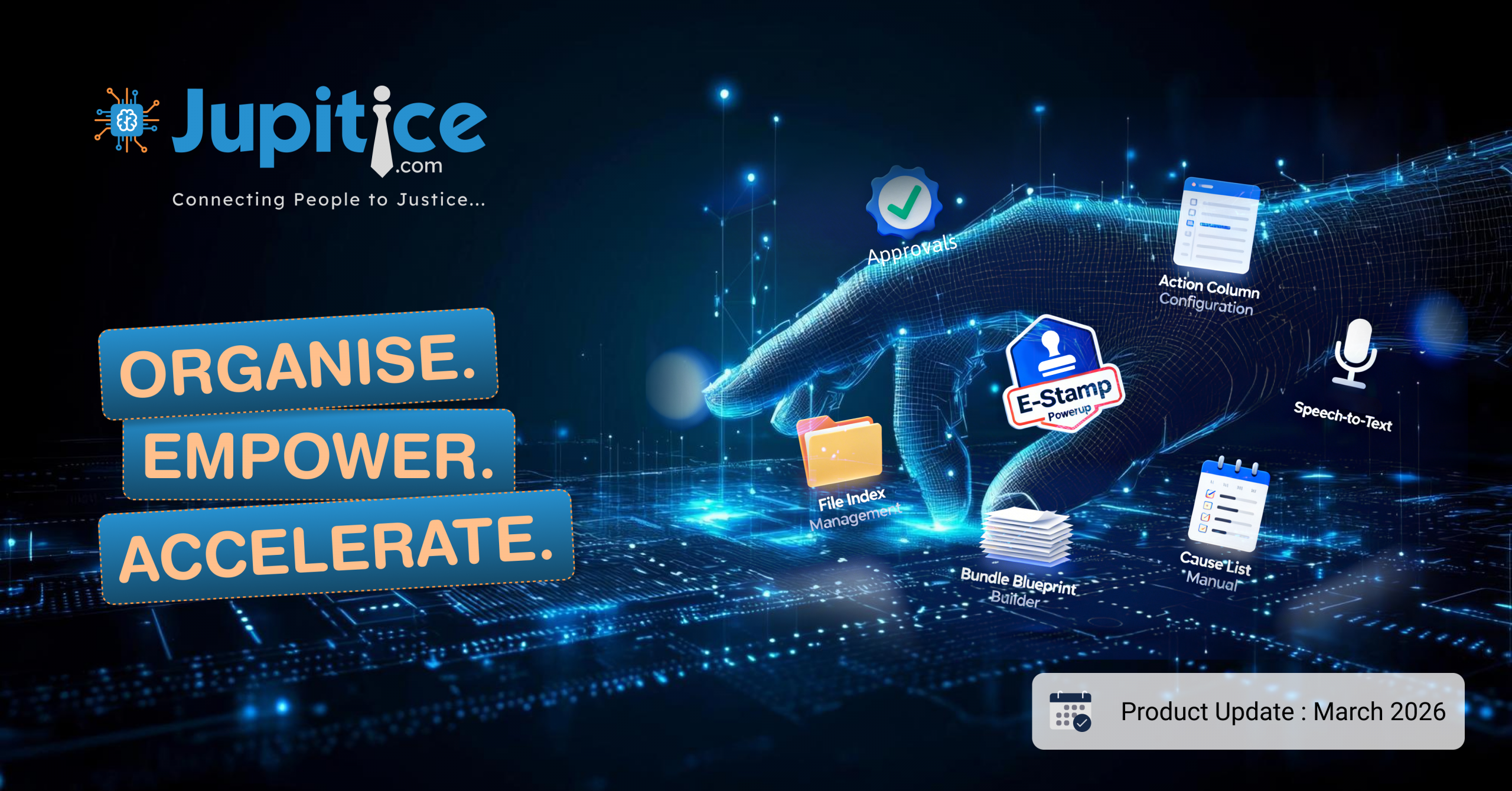
- New Functionality: E-Stamping Integration into the Platform (Web): We have implemented ‘E-Stamping’ Integration on the platform, enabling users to generate, procure, and attach financial and non-financial e-stamps directly within the system via vendor APIs, speeding up the document workflow and eliminating manual external procurement.
- Action Column Configuration Support with Index Layout from Blueprint Actions (App): We have implemented Action Column Configuration Support, enabling actions defined in the blueprint to automatically appear in the index/table action column, removing the need for manual UI updates and ensuring better alignment with blueprint configurations.
- Speech-to-Text Support for Paragraph Event Form Field (App): We have implemented ‘Speech-to-Text’ support for the Paragraph field in event forms, enabling users to dictate content using voice and automatically convert it into editable text for faster and more convenient form entry.
- Add New Powerup Type – “E-Stamp” in Form Fields (Web): We have added a new “E-Stamp” Powerup Type in form fields, allowing users to configure e-stamping directly through a dedicated setup panel similar to the E-Sign Powerup, making document preparation more streamlined and efficient.
- File Index Management for Uploaded Files and Smart Documents (Web): We have added ‘File Index Management’, allowing users to organize and navigate uploaded files and smart documents with manual or AI-generated indexes for faster and easier content access.
- Bundle Management: Blueprint Builder, Viewer, Annotation, Indexing and Pagination (Web): We have introduced Bundle Management to unify multiple files into a single structured document with seamless viewing, annotation, indexing, and dynamic PDF generation for improved document handling.
- Cause List – Manual (Creating/Preview) (App): We have developed the; Cause List – Manual (Create/Preview)’ feature to enable users to view scheduled hearings, create and record new hearing details, upload daily orders, preview the information, and securely save it for easy access in the cause list section.
- Dashboard and Features for all Mobile Applications V2 (App): We have implemented a dynamic dashboard that provides real-time insights into active cases, upcoming hearings, assigned tasks, and recent updates, along with quick navigation and management shortcuts to improve workflow efficiency.
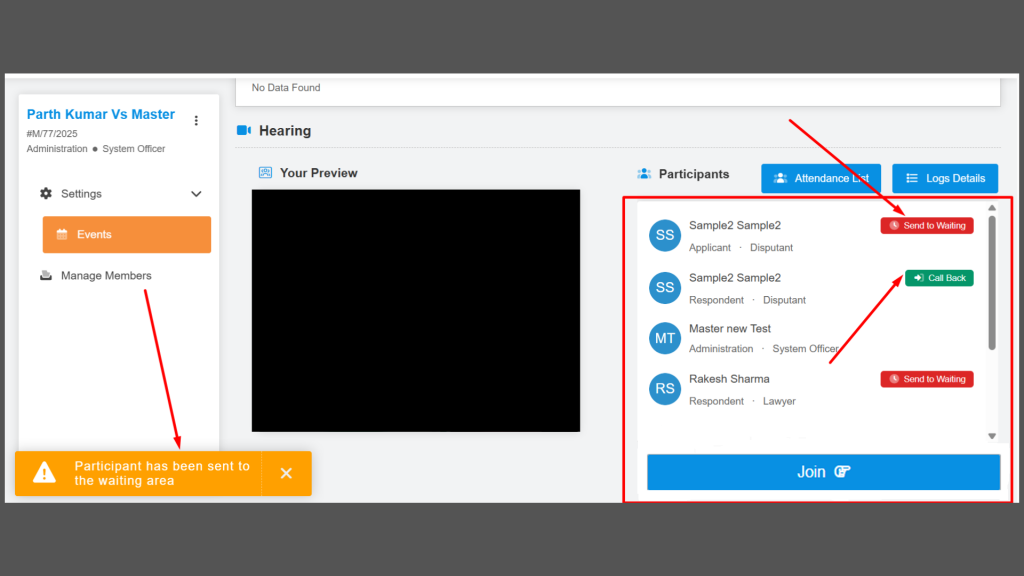
- Sending the Participant to the Waiting Room or Lobby (Web): We have added a feature that allows authorized hosts to manage participants by moving them between the hearing room and waiting room in real time without disrupting proceedings.
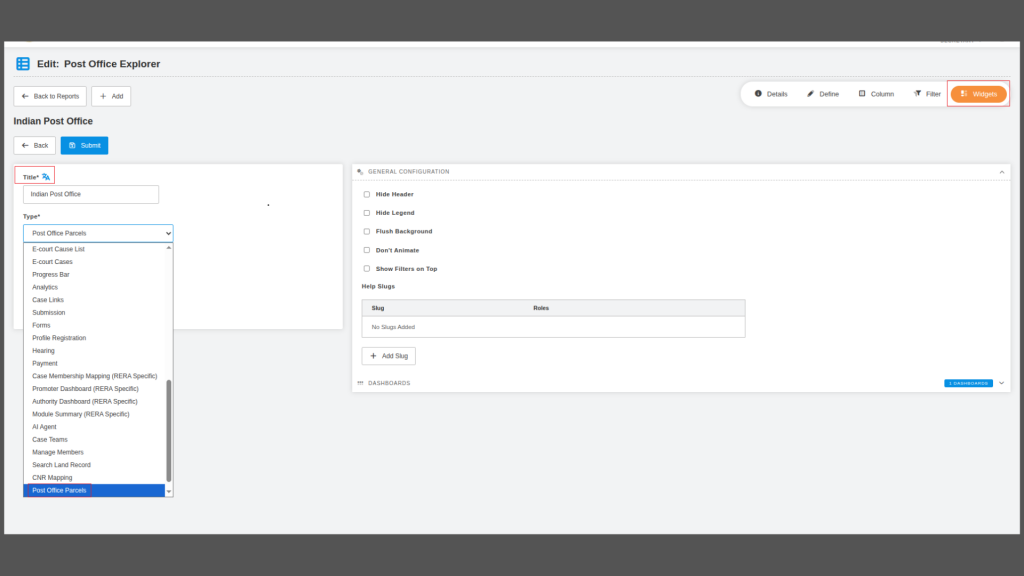
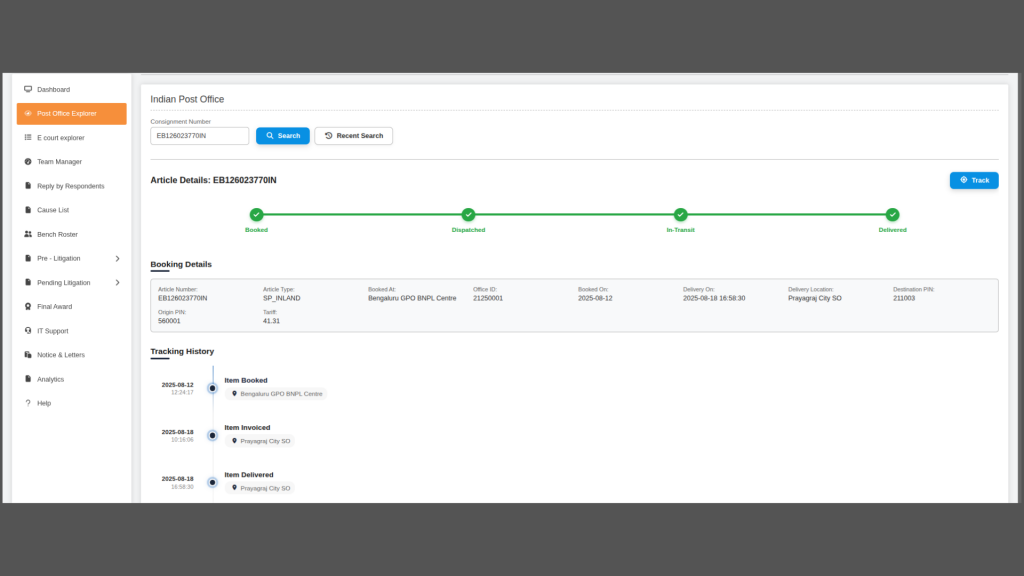
- New Widget Type- India Post Explorer (Web): We have implemented the ‘India Post Explorer’ widget to enable quick consignment tracking, with search, recent history, live tracking via the API, and access to shareable article details.
- Feature Development and Enhancements at the Blueprint Builder (Web): We have enhanced the ‘Blueprint Builder’, reports, and form builder with improved field controls, better navigation, placeholder support, a new parties builder, and fixes to title field formatting for a smoother user experience.
- Multi-Level Field Approvals with Common Description and Checklist Integration (Web): We have implemented multi-level field approvals with shared descriptions, real-time status tracking, and role-based controls to ensure a transparent and structured approval process.
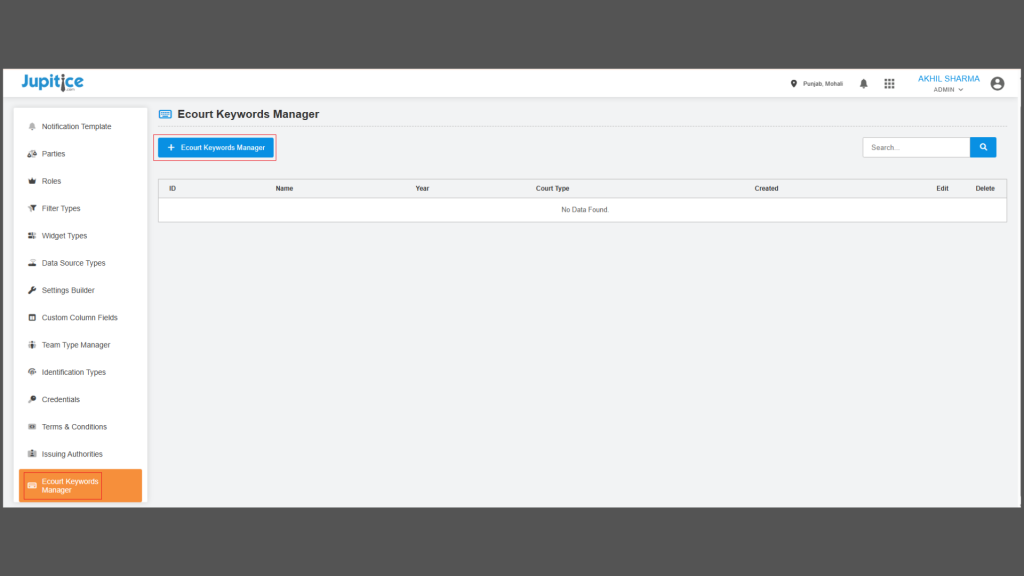
- Enhancement in Keyword Manager Settings (Web): We have enhanced ‘Keyword Manager Settings’ with user-driven case fetching, scheduling, RUN controls, and seamless case import to automate and streamline E-Court data workflows.
- Custom Calendar Widget (App): We have introduced the Custom Calendar Widget feature to help users easily track, manage, and access case-related events through an intuitive calendar interface.
- Chrome Extension for E-filing (Web): We developed a Chrome extension that extracts data from uploaded PDF petitions and automatically fills e-filing forms, making the process faster, easier, and error-free.
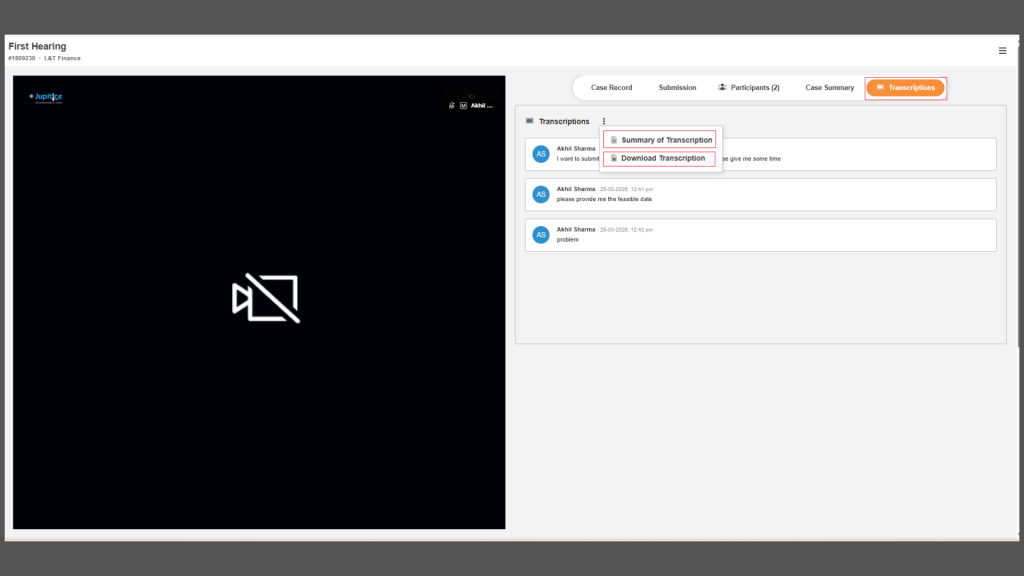
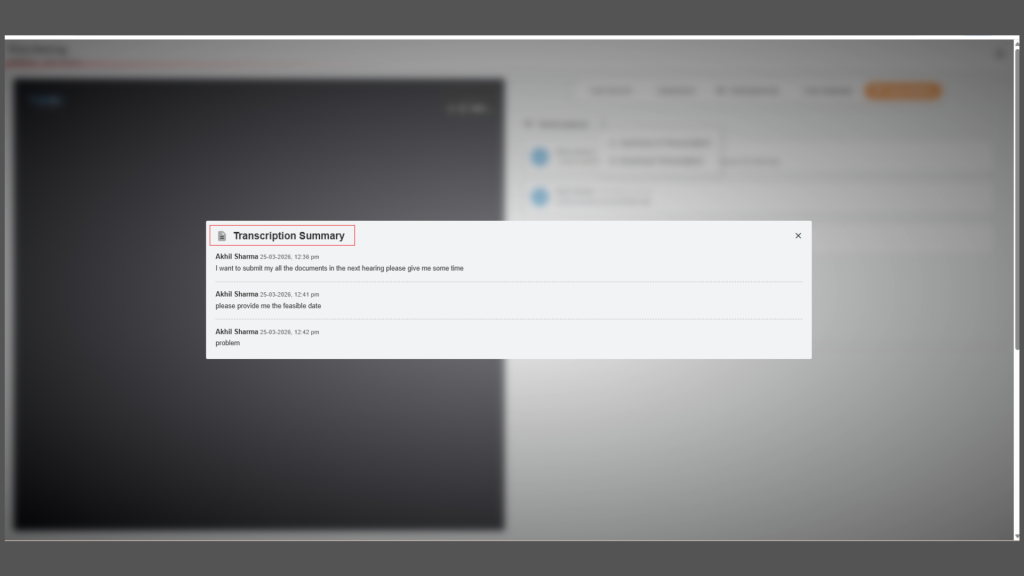
- Real-Time Transcription with Subtitles for Hearing Room (Web): We have implemented real-time audio transcription with live subtitles, speaker identification, and automatic transcript saving, along with a simple on/off toggle for flexible use during hearings.
- Comprehensive Overhaul of the Artemis Status Page (Web): We have transformed the Artemis /status page into a modern, real-time Infrastructure Dashboard with modular navigation, unified metrics, auto-refresh capabilities, and an enhanced UI for seamless system monitoring and management.
New Functionality: E-Stamping Integration into the Platform (Web)
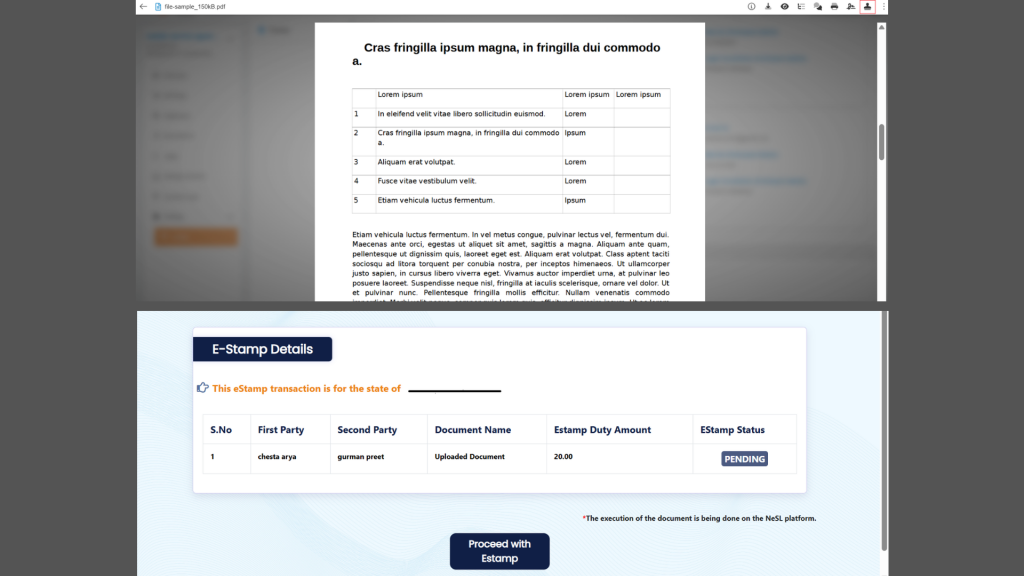
We have implemented an E-Stamping Integration on the platform to make the process of procuring and attaching e-stamps simpler and faster for users. With this new functionality, the platform is integrated with third-party vendor APIs, allowing users to generate, approve, and attach e-stamps directly while creating documents without leaving the system. The integration supports both financial and non-financial e-stamping services and offers flexibility through online and offline issuance options. In the online mode, users can generate and retrieve approved e-stamps in real time through API calls during document creation, enabling instant availability of the required stamp. In offline scenarios, users can submit the necessary details through the platform. The vendor then processes the request, and the issued e-stamp is received and integrated into the system for use. Earlier, the platform did not provide direct e-stamping capabilities, which required users to manually procure e-stamps from external vendors, download the PDF copies, and then upload them back to the platform to attach them to their documents, making the process time-consuming and less efficient. With this new enhancement, the entire e-stamping workflow is streamlined within the platform, reducing manual effort, saving time, and providing a smoother and more efficient document management experience for users.
Action Column Configuration Support with Index Layout from Blueprint Actions (App)
We have implemented Action Column Configuration Support with Index Layout from Blueprint Actions to make the platform more flexible and easier to manage. With this enhancement, the Action column in the index or table view can now be configured dynamically based on the actions defined in the blueprint. This means that the required actions will automatically appear in the index layout according to the blueprint setup, instead of relying on hardcoded UI logic. Earlier, whenever a new action was added in the blueprint, it often required manual implementation in the UI for it to appear in the index view, which made the process time-consuming and less efficient. With this improvement, any action configured in the blueprint will automatically reflect in the action column, ensuring better alignment between blueprint configurations and the user interface while reducing manual effort and making the system easier to maintain.
Speech-to-Text Support for Paragraph Event Form Field (App)
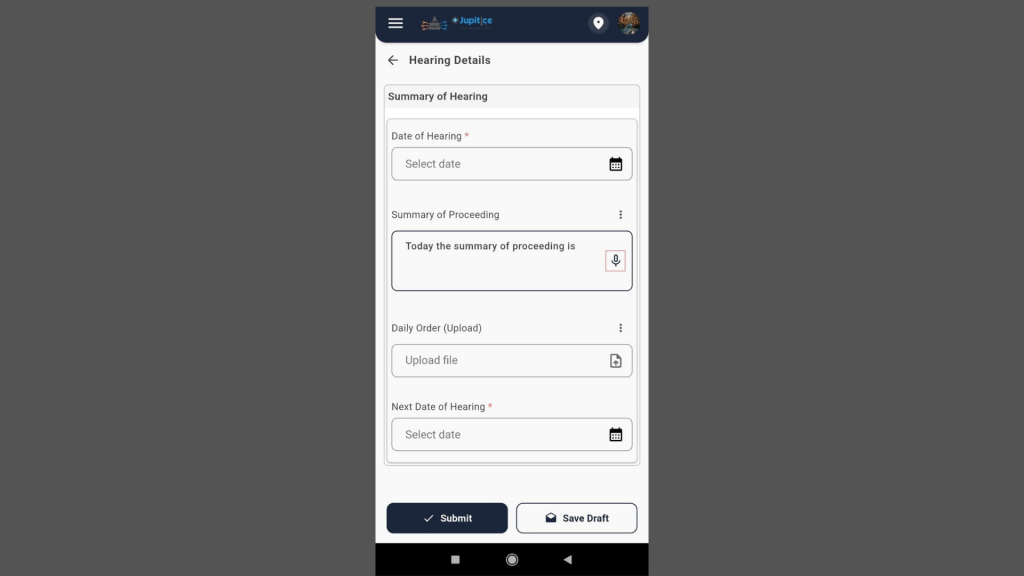
We have implemented Speech-to-Text Support for the Paragraph field in Event forms, allowing users to enter content using voice instead of typing. With this enhancement, users can simply speak, and the system will automatically convert their speech into text within the paragraph field. The feature supports continuous dictation, ensuring that spoken input is smoothly captured and inserted into the field as formatted paragraph content. Users can also edit or modify the text after transcription, just like regular typed content. This functionality works across supported devices and maintains the existing validation and save behaviour of the form. Overall, this enhancement makes it easier and faster for users to capture detailed information in event forms, improving convenience and efficiency while entering long text content.
Add New Powerup Type – “E-Stamp” in Form Fields (Web)
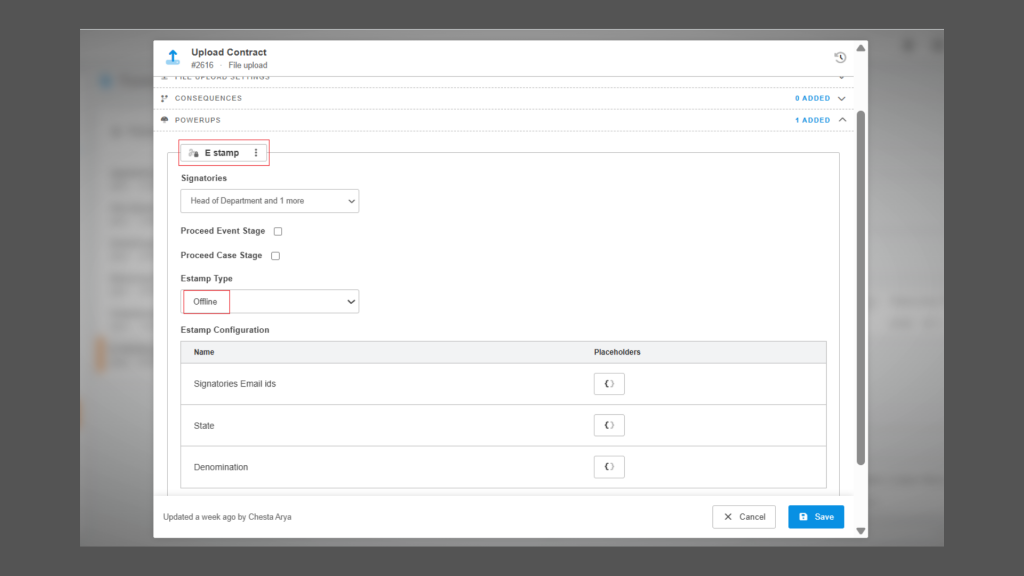
We have added a new Powerup Type called “E-Stamp” in form fields to support seamless e-stamping within the platform. With this enhancement, users can now select “E-Stamp” from the Powerup Type dropdown, and once selected, clicking “+ Add Powerup” opens a configuration panel where users can set the required e-stamp details. The interface is designed similarly to the existing E-Sign Powerup, making it familiar and easy to use, while also including additional fields required for e-stamp configuration. This update helps users configure and manage e-stamping directly within forms, streamlining and improving the overall document preparation process.
File Index Management for uploaded Files and Smart Documents (Web)
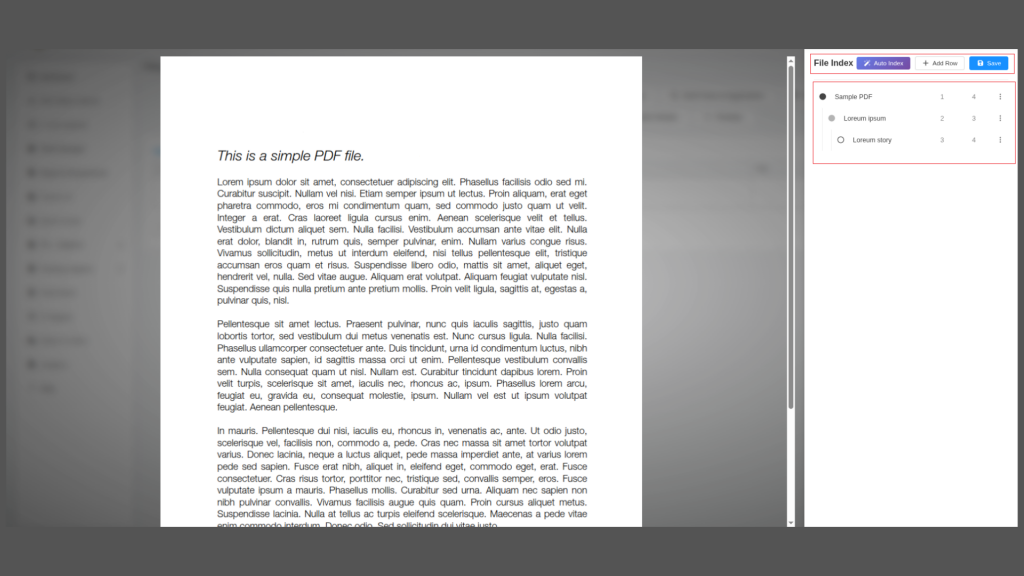
We have added File Index Management for uploaded files and smart documents, making it easier for users to organize and navigate their content. With this feature, every uploaded file and smart document now has an associated File Index that can be created and managed manually or generated automatically using AI. Users can add, edit, and manage index rows with properties such as Description, Parent, Start Page, and End Page, ensuring the file’s content is structured and easy to navigate. For faster indexing, the AI Auto Indexing option can generate the index automatically based on the file content, after which users can review, edit, and choose to accept or reject the AI-generated index. Accepting it replaces the existing index, and users can regenerate it at any time. This enhancement helps users efficiently organise documents, quickly find content, and maintain a clear structure for both uploaded files and smart documents.
Bundle Management: Blueprint Builder, Viewer, Annotation, Indexing and Pagination (Web)
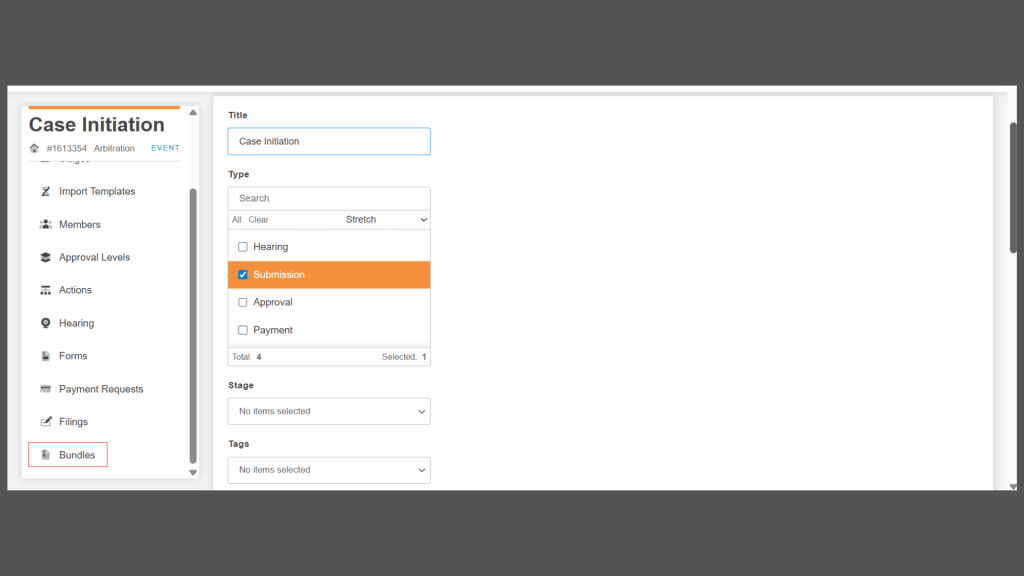
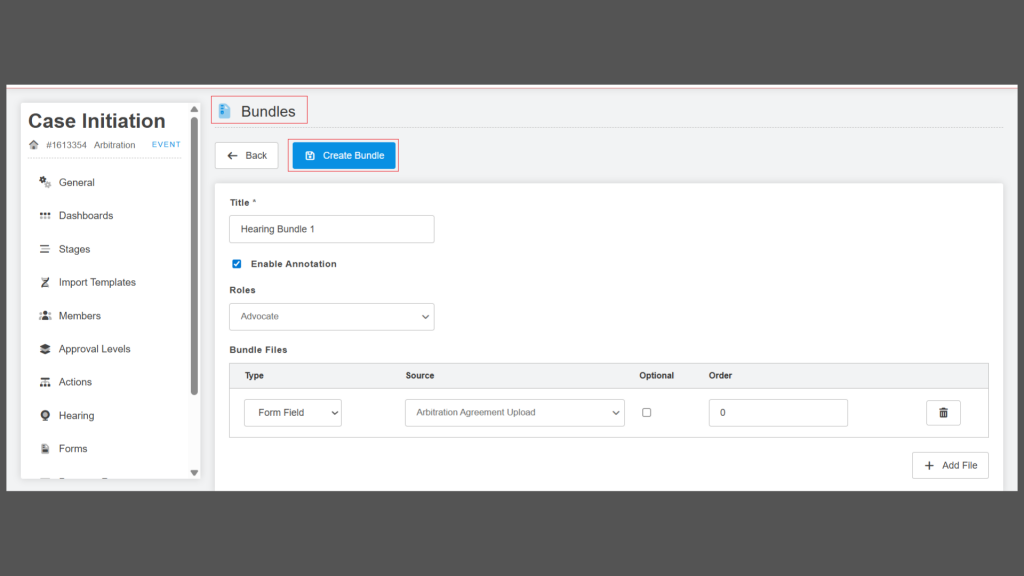
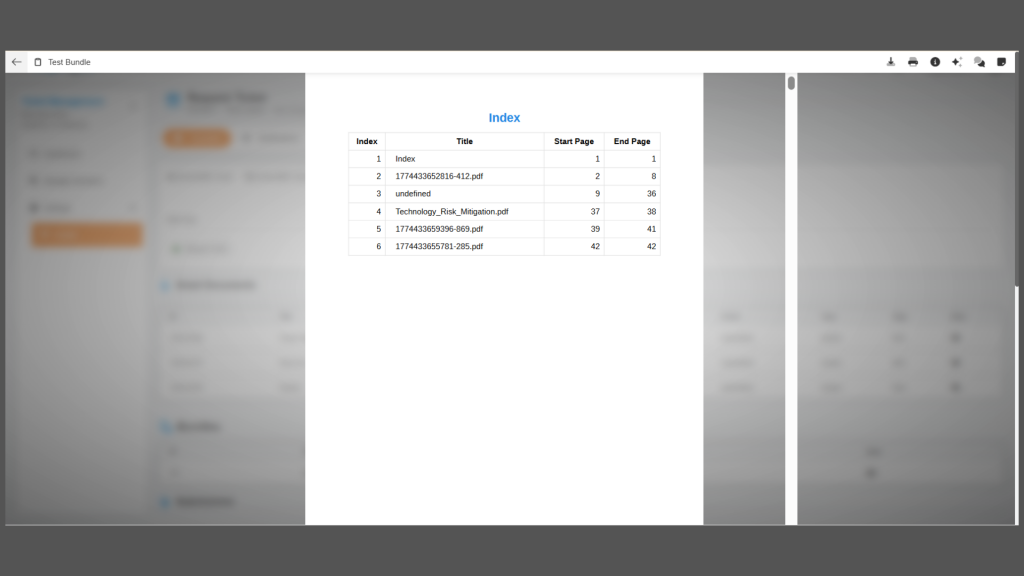
We have implemented a comprehensive Bundle Management feature that enables users to organize, manage, and interact with multiple files and smart documents as a single structured bundle at the Blueprint event level. Through the Bundle Blueprint Builder, users can define bundle structures by configuring elements such as title, short URL, document sequence, and file-level properties, including type, order, and optionality—where optional files are skipped if unavailable and mandatory files display placeholders. We have also introduced role-based annotator access to ensure controlled collaboration. Bundles can be accessed via a unified Bundle Viewer, which dynamically renders all documents into a seamless, single PDF view with built-in indexing and pagination for easy navigation, without storing the compiled file on the server. In addition, we have implemented file-level annotations, allowing users to add contextual feedback directly within files; these annotations are embedded within the file, remain restricted to its context, and are accessible even via short URLs. To enhance usability, we have provided an integrated side panel that enables annotation management, displays file information, and supports tools like Saya Agent and voice dictation, delivering a streamlined and collaborative document experience.
Cause List – Manual (Creating/Preview)(App)
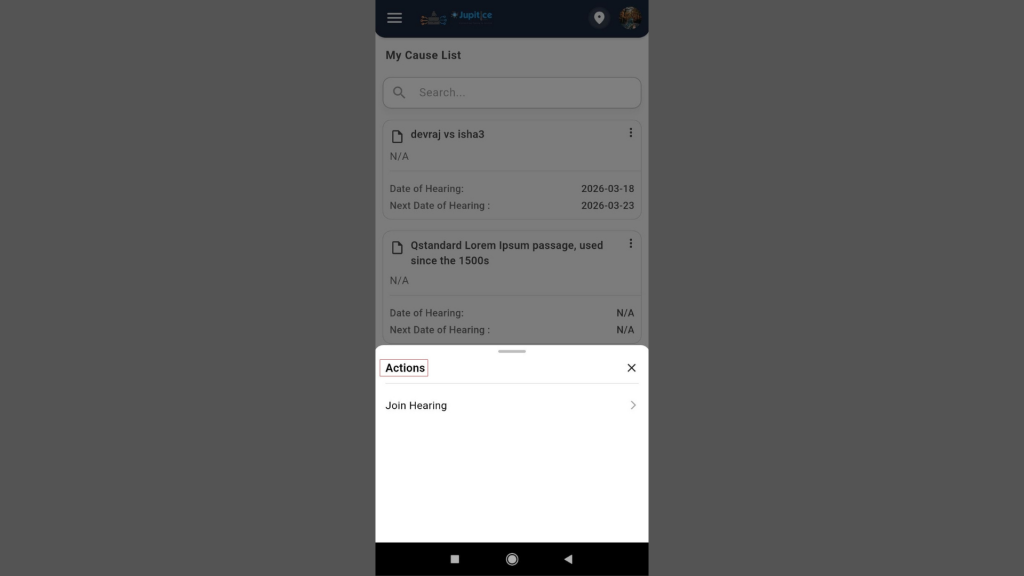
We have developed the Cause List – Manual (Create/Preview) feature to streamline the management and recording of hearing details in the system. Through this module, users can access the Cause List section from the main menu to view a list of scheduled hearings, each displaying essential information such as the Case Title, Date of Hearing, Next Date of Hearing, and a View action button. By clicking the View option, users are redirected to the Hearing Detail Page, where they can review complete information related to a specific hearing. The module also allows users to create a new hearing by selecting the Create New Hearing option, which opens a form where details such as the Date of Hearing and Summary of Proceedings can be entered, with the flexibility to add additional information fields using the “+” button if required. Users can then upload the Daily Order document and select the Next Date of Hearing. After entering all the necessary details, the Save & Next option takes the user to a Preview Page where all information can be reviewed before final submission. If any changes are needed, users can edit the details and proceed to submit the record. Once submitted, the hearing information is securely saved and automatically updated in the Cause List section, allowing users to access detailed hearing information at any time via the View option.
Dashboard and Features for all Mobile Applications V2 (App)
We have implemented a dynamic Dashboard that provides users with a clear overview of their daily work and important activities. The Dashboard displays key metrics such as total active cases, upcoming hearings, and assigned tasks, with all data fetched dynamically when the screen loads to ensure users always see the latest information. Active cases are calculated by counting only those with the status marked as “Active,” while closed or archived records are excluded. Upcoming hearings include only those scheduled for today or future dates, ensuring completed hearings are not counted. The assigned tasks section shows only tasks allocated to the logged-in user and includes those with statuses such as Pending or In Progress. In addition, the Dashboard highlights recently updated case files by displaying the case number and either the case title or the client name, allowing users to quickly access important records. Users can click on a specific case to navigate to the Case Detail screen, or select “View All” to open the Matter Management screen. We have also included a Manage section with quick access shortcuts for Client Management, Matter Management, and Task Management, enabling faster navigation to key modules. To further improve efficiency, a Quick Add “+” button is available on the Dashboard, allowing users to create a new case file directly from the creation form.
Sending the Participant to the Waiting Room or Lobby (Web)
We have added a feature that enables the hearing host to efficiently manage participants by moving them between the hearing room and a waiting room or lobby without disrupting ongoing proceedings. During an active session, the host can view the complete participant list, select any individual, and instantly transfer them to the waiting area or bring them back into the hearing room as needed. This enhances control over attendance and helps maintain the decorum of the session. The feature is permission-based, allowing only authorized users such as the hearing host or admin to perform these actions, with all changes reflected in real time. Additionally, we have introduced a configurable setting to enable or disable this functionality per organisational requirements.
New Widget Type: India Post Explorer (Web)
We have implemented the India Post Explorer widget in the widget type section of reports to simplify tracking and retrieving consignment proof details, such as dispatch and delivery. Users can enter a consignment number and click Search to view results, while the Article Details section remains blank until a search is performed. A Recent Search feature allows users to view past searches in a pop-up with key details for quick access. The Article Details section displays tracking information in a structured format and includes a track button in the top-right corner. On clicking, the consignment ID is saved and continuously monitored via API; if already tracked, the button shows “Tracked” and does not re-trigger tracking. Additionally, the article’s details page is accessible via a dedicated URL, enabling easy access from anywhere.
Feature Development and Enhancements at the Blueprint Builder (Web)
We have implemented several feature enhancements and new developments across the Blueprint Builder, Reports, and Form Builder to improve usability and functionality. Key updates include the introduction of a multiselect Chrome-style dropdown in field settings for better selection control, renaming “Reference Event” to “Actions” and reordering tabs for improved navigation, and enabling placeholder rendering within list column configurations for enhanced data clarity. Additionally, a new Parties Builder has been added to the blueprint’s left menu with seamless mapping to global parties, streamlining entity management. We have also addressed formatting issues related to the TITLE field type in the form builder, ensuring consistent and accurate display across forms.
Multi-Level Field Approvals with Common Description and Checklist Integration (Web)
We have implemented field-level approvals with multi-level approvers in the Blueprint Builder to enable a more structured and transparent approval process across views such as Table, Vertical Table, Short Answer, and Paragraph. This enhancement introduces a Common Description and checklist that appears throughout the approval lifecycle, along with configurable approval labels and a minimum approval requirement displayed as a status (e.g., 2/3 or 3/3). On the approval configuration screen, users can define approval levels with specific labels for approval, rejection, and “requires more information,” each with a description that appears in the approval pop-up. Additional capabilities include optional mandatory comments during approval actions, visibility of approvers’ names and designations, real-time status tracking (Approved, Rejected, Pending, Requires More Information), and detailed comment display. The system ensures users cannot proceed without required inputs, returns seamlessly to the form after actions are completed, and supports hover-based insights such as the user name, action date, and status. Role-based access is also integrated, ensuring only mapped users can take approval actions, making the entire process more controlled, auditable, and user-friendly.
Enhancement in Keyword Manager Settings (Web)
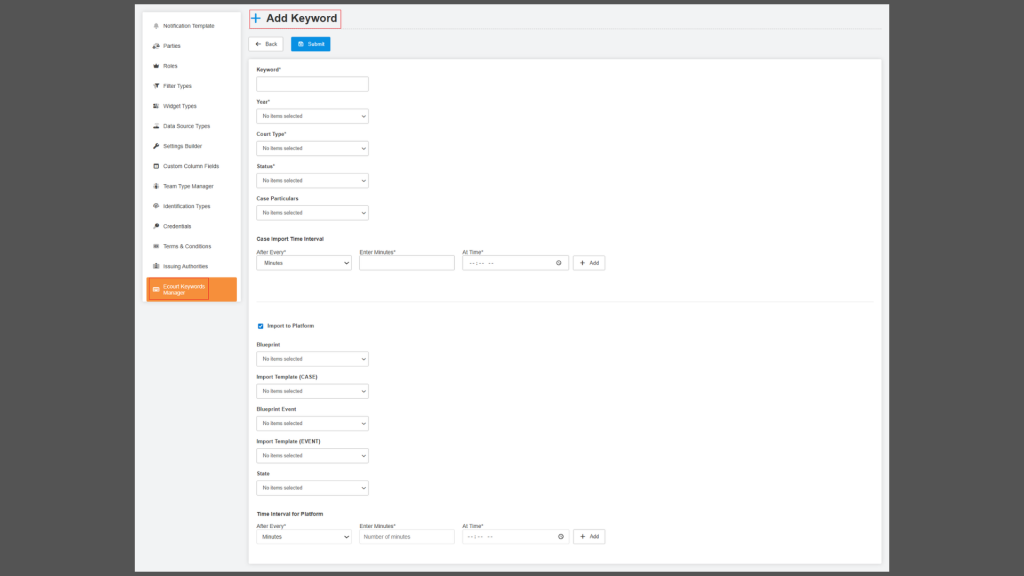
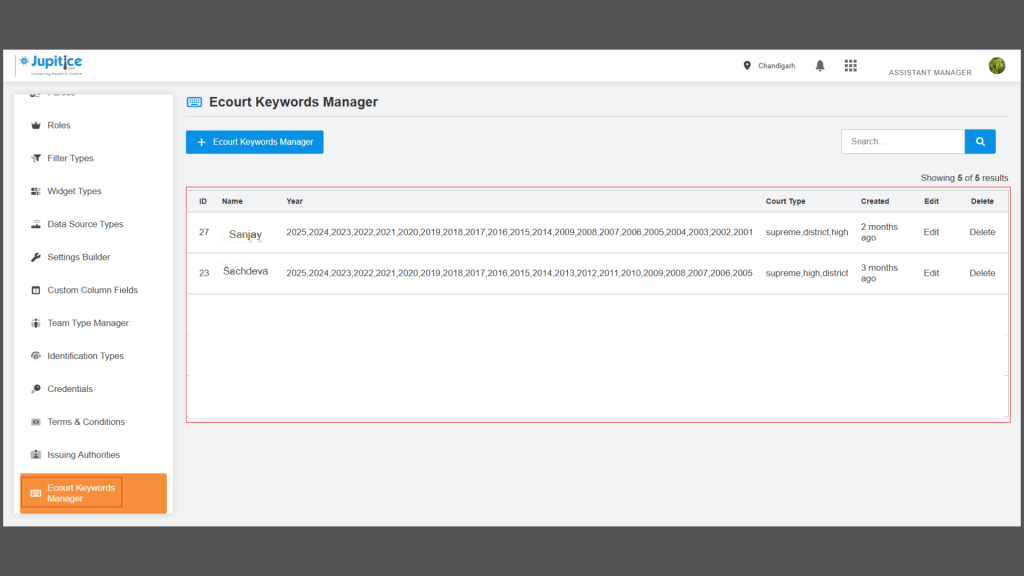
We have enhanced the Keyword Manager Settings to enable a more dynamic, user-driven approach to fetching and managing E-Court case data directly from the frontend. With this update, users can configure keywords with advanced controls, including status (enabled/disabled), customizable time intervals for automated fetching, and multi-select case particulars such as case details, orders, and cause lists. A newly introduced RUN button allows users to initiate the fetch process instantly, with real-time feedback via statuses such as “Job Initiated” and “Job in Process,” and a dedicated RUN STATUS column for visibility. Additionally, users can opt to import fetched cases directly into the platform by configuring blueprints, events, and templates, ensuring seamless case filing aligned with predefined mappings. The enhancement also includes detailed audit information, such as creation/last update timestamps, user details, and edit history, to improve tracking and transparency. Overall, this upgrade eliminates manual backend dependencies, introduces automation with flexible scheduling, and significantly improves efficiency and control over case data workflows.
Custom Calendar Widget (App)
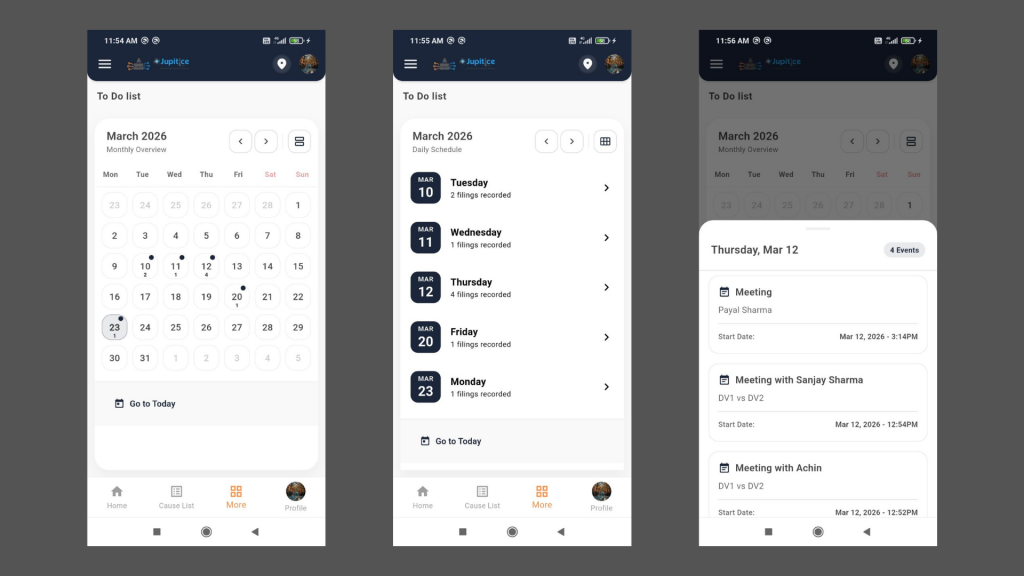
We have introduced the Custom Calendar Widget feature, which provides a centralized and user-friendly way to manage all case-related activities, including court hearings, meetings, consultations, and legal notices, through a calendar-based interface in our mobile application. Users can easily access the calendar from the “More” section, where they will see a monthly view that highlights important dates with scheduled events. The feature allows for seamless navigation between months, includes a toggle between monthly and daily views, and offers a “Go to Today” option for quickly focusing on the current date. When a specific date is selected, it is highlighted, and an event indicator displays the number of scheduled activities for that date. Tapping on a date opens a detailed event list panel that includes key information such as the event type, participant or party name, and start date and time. This enhancement enables users to efficiently track their schedules and quickly navigate to relevant case details, ultimately improving productivity and organization.
Chrome Extension for E-filing (Web)
We have developed a Chrome extension to make the e-filing process easier and faster by reducing manual work and errors. This extension works alongside the existing e-filing portal and appears as a side panel in the browser. While filling out the form, users such as litigants or advocates can simply upload their petition in PDF format through the extension. The tool then reads the content of the document and automatically fills in the required and optional fields in the form. This helps ensure that important details are not missed and saves time by avoiding repeated typing. After completing the form, the normal process continues, including the generation of a provisional e-filing number and further system processing. By combining PDF data extraction with direct form filling, our extension makes the entire e-filing experience smoother, quicker, and more reliable.
Real-Time Transcription with Subtitles for Hearing Room (Web)
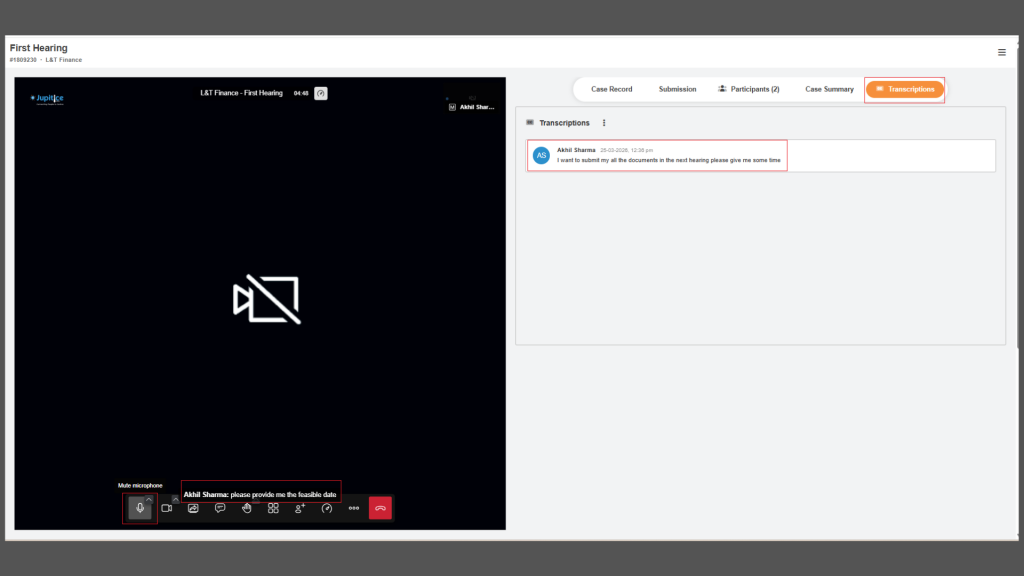
We have successfully implemented a real-time transcription feature with on-screen subtitles to enhance the overall hearing room experience. During each session, our system actively captures audio and converts spoken conversations into accurate, real-time text that is displayed instantly as subtitles. These subtitles update continuously as participants speak, ensuring a seamless and easy-to-follow experience even in situations with poor audio quality or varying accents. We have also integrated speaker identification, allowing users to see who is speaking alongside the transcribed text, which adds clarity and context to the discussion. Once the hearing concludes, the complete transcript is automatically saved for future reference, supporting transparency and record-keeping. Additionally, we have provided a simple configuration option to toggle the transcription feature on or off, giving users full control over their experience while maintaining flexibility and ease of use.
Comprehensive Overhaul of the Artemis Status Page
We have comprehensively reengineered the Artemis /status platform page into a modern, extensible Infrastructure Dashboard that delivers real-time visibility across the entire distributed system. This overhaul introduces a modular tab-based architecture built on a standardized base class, enabling clean lifecycle management and seamless navigation between subsystems such as Session, Environment, Node, MySQL, Redis, Puppeteer, and RabbitMQ without full page reloads. We have implemented a unified dashboard that dynamically generates overview cards for each component, paired with clear, dual-layer descriptions to make complex infrastructure more accessible. On the backend, we have centralized all metric formatting into structured {value, unit, description} payloads, simplifying frontend rendering and ensuring consistency. The platform now includes a global auto-refresh system with configurable polling intervals, intelligent request handling, and real-time feedback via SnackBar notifications. Complementing these technical improvements, we have fully redesigned the UI with responsive navigation, expandable data views, status indicators, and robust empty-state handling. Additionally, we have aligned the Alt + A and Settings > About interfaces with the new design, introducing quick actions like cache clearing, session management, and direct account access. Together, these enhancements transform the status page from a static monitor into a scalable, user-friendly control center for infrastructure observability and management.