Key Highlights
- Bulk Case Import Enhancement and End-to-End Workflow Validation: We have implemented and validated the Bulk Case Import workflow to ensure accurate case mapping, a seamless submission flow, and a consistent end-to-end user experience.
- WhatsApp API Creation and Integration: We have implemented a secure, scalable WhatsApp API integration to automate case and hearing notifications via dynamic data retrieval, template-based messaging, and comprehensive workflow logging for High Court systems.
- Admin Dashboards for WhatsApp Analytics, Monitoring, and Support Management: We have implemented comprehensive admin dashboards for the High Court platform to enable real-time WhatsApp communication analytics, monitoring, reporting, export management, and support operations through interactive KPI-driven insights.
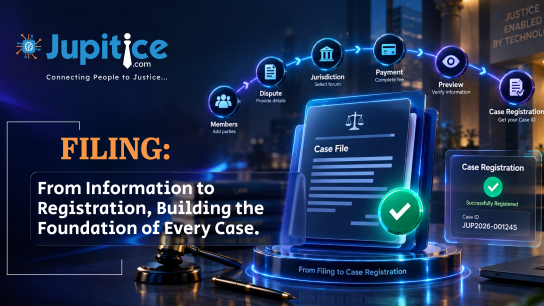
- Case Filing Dashboard for Single and Bulk Arbitration Case Management with End-to-End Workflow Automation: We have implemented a unified Case Filing Dashboard enabling single and bulk arbitration case creation through a structured workflow, dynamic data mapping, and complete case lifecycle tracking with listing, actions, and import capabilities.
- Loan Recall Notice (LRN) Management and Bulk Processing Module: We have implemented a comprehensive Loan Recall Notice (LRN) module with structured case mapping, validation-driven workflows, preview and review capabilities, automated notice generation, and bulk import support for efficient recovery operations.
- High Court WhatsApp API Integration for Automated Case and Hearing Notifications: We have implemented a secure WhatsApp API integration for High Court systems to automate case and hearing notifications through dynamic data retrieval, template-based messaging, and end-to-end workflow logging.
Bulk Case Import Enhancement and End-to-End Workflow Validation
We have implemented a ‘Bulk Case Import’ functionality with end-to-end workflow validation, ensuring a seamless, consistent user experience aligned with the primary case listing interface. Imported cases are now displayed accurately without blank or missing rows, with all key attributes, including title, category, stage, date, status, and urgency, correctly mapped and reflected across the system. Default values such as urgency are automatically applied when source data is unavailable, while status and stage information are presented in a clear, user-friendly, and meaningful format. The bulk import view has been standardised to match the main case listing UI for consistency, and the submission flow has been streamlined with clearer, more intuitive action terminology. The entire process—from file upload through successful case visibility—was thoroughly validated to ensure reliable performance without interruptions or errors. Multiple test scenarios were executed successfully, confirming stable behaviour, consistent workflows, and a 100% validation rate across all user journeys.
WhatsApp API Creation and Integration Bottom of Form
We have implemented a secure and scalable ‘WhatsApp API’ integration within the platform to facilitate automated notification workflows for High Court systems. The solution enables internal court applications to initiate API requests using minimal identifiers, such as a Case ID or Hearing ID, and the system intelligently retrieves predefined case- and hearing-related information—including party details, courtroom allocation, hearing schedules, and associated case metadata—from integrated court management systems. The fetched data is seamlessly mapped to standardized WhatsApp notification templates, ensuring accurate, structured, and timely communication to registered recipients through the integrated messaging service. Additionally, the complete workflow—including API invocation, data processing, template generation, notification delivery, status tracking, and exception handling—is comprehensively logged to support operational transparency, audit compliance, system reliability, proactive monitoring, and streamlined troubleshooting.
Admin Dashboards for WhatsApp Analytics, Monitoring, and Support Management
We have implemented comprehensive administrative dashboards within the ‘High Court’ platform to provide centralised analytics, monitoring, access to documentation, and support management capabilities for WhatsApp communication workflows. The enhanced dashboard suite enables administrators to monitor key messaging KPIs through interactive visualizations, including total message volume, delivery funnel analysis, communication trends, content distribution, error analysis, and cumulative messaging costs. Advanced filtering options such as date range selection, status-based filtering, content-type categorization, and search by recipient number or message ID allow precise data analysis and operational tracking. The solution also includes detailed message lifecycle reporting with visibility into message IDs, recipient details, delivery statuses, timestamps, templates used, and associated messaging costs, along with export functionality for CSV and Excel formats to support offline analysis, auditing, and reporting requirements.
Case Filing Dashboard for Single and Bulk Arbitration Case Management with End-to-End Workflow Automation
We have implemented a comprehensive ‘Case Filing Dashboard’ to enable users to efficiently initiate single arbitration cases or import cases in bulk, ensuring seamless end-to-end case management from filing to completion. The dashboard includes a centralized “My Task Board” interface with navigation, search, date filtering, and primary actions for initiating arbitration or bulk importing cases. The single case filing process is designed as a structured, multi-step wizard that covers party details, claim details, asset and banking information, compliance fields, financial data, and foreclosure details, with support for both new and existing users, advocate mapping, strict field validations, and controlled input types. A final preview step ensures data accuracy before submission, after which cases are automatically added to the main case listing. The case listing provides detailed tracking with pagination, status visibility, and actionable controls, including edit, delete, and summary PDF generation. Additionally, the bulk import functionality allows users to upload CSV/Excel files, dynamically map fields, preview data, auto-create users when required, and generate multiple cases in a single submission, ensuring scalable and efficient case onboarding.
Loan Recall Notice (LRN) Management and Bulk Processing Module
We have implemented a comprehensive Loan Recall Notice (LRN) management module to streamline the creation, validation, review, and processing of notices for multiple loan accounts, ensuring timely, accurate, and compliant communication for recovery workflows. The module enables users to select valid loan accounts directly from system records, with customer information auto-fetched and mapped to the corresponding case. Users can capture critical foreclosure, agreement, branch, scheduling, and authorization details through structured forms with strict validations for mandatory fields, date formats, numeric values, time ranges, and record authenticity. A dedicated preview and review stage allows users to verify all entered information, identify missing or invalid data, and make corrections before final submission. Upon successful validation, the system generates the Loan Recall Notice, saves the record, and updates the linked case automatically. The module also supports efficient bulk processing through CSV/Excel upload functionality with template-based validation, duplicate detection, error highlighting, preview capability, and selective import processing, ensuring that only valid records are successfully created while invalid entries are rejected with detailed error logs for operational transparency and troubleshooting.
High Court WhatsApp API Integration for Automated Case and Hearing Notifications
We have implemented a secure WhatsApp API integration for High Court systems, enabling automated notification workflows via the platform. The solution allows internal court systems to trigger APIs with minimal identifiers, such as Case ID or Hearing ID, after which predefined case and hearing details—including party names, courtroom information, hearing schedules, and related metadata—are automatically retrieved from court management systems. The fetched information is dynamically mapped to predefined WhatsApp templates and dispatched to the relevant registered recipients via the integrated messaging service. The complete workflow, including API invocation, data retrieval, template mapping, message delivery status, and failure handling, is logged in full to ensure operational transparency, audit readiness, reliable monitoring, and efficient troubleshooting.